Computer vision at the edge: smart cameras that decide locally
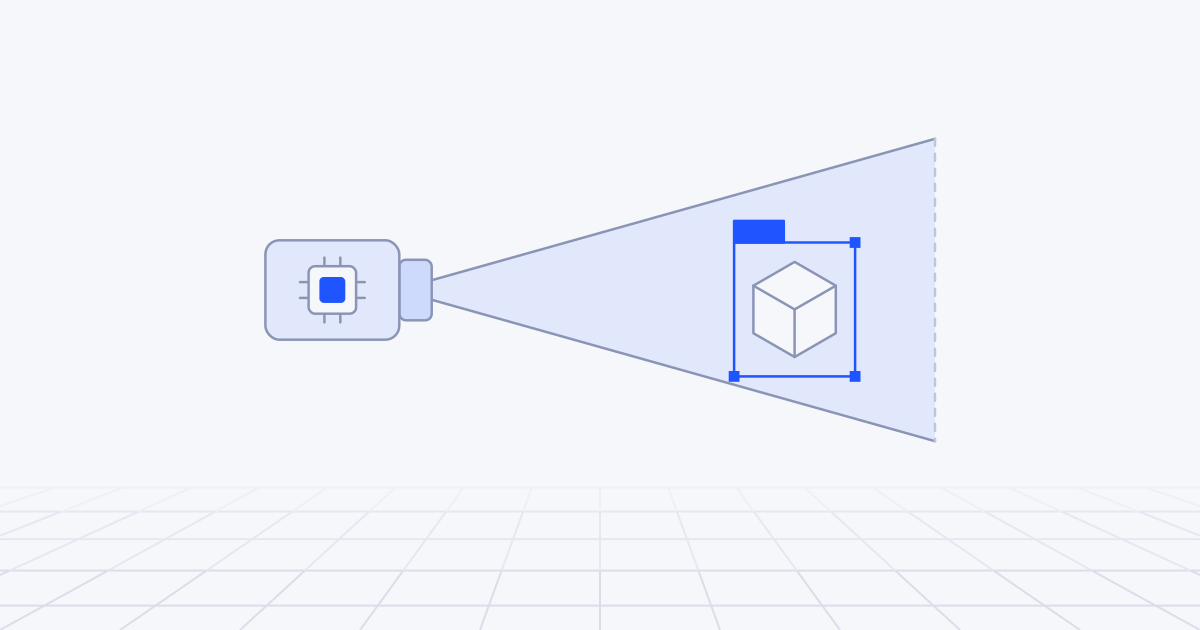
Edge computer vision means running detection and tracking on the camera or on a small computer next to it, and sending events in place of video. Do it when bandwidth is limited, when a response is needed within a second, or when footage of people should not leave the building. Accuracy depends less on the chip or the model than on where the camera is mounted and how the scene is lit.
Why process video where it is captured?
Video is the heaviest data a sensor produces and the most personal. Both facts argue for dealing with it on the spot.
Send every stream to the cloud and you pay for the uplink, wait on the round trip and take custody of footage of people. Run the model on site and what leaves the building is a short message:
{
  "camera": "bay-07",
  "event": "vehicle_dwell_exceeded",
  "class": "lorry",
  "track_id": 4412,
  "zone": "bay-07-apron",
  "started": "2026-07-03T06:12:09Z",
  "dwell_s": 1840,
  "confidence": 0.91,
  "model": "bay-detector@3.2.0"
}
A few hundred bytes, no faces, and it can update a screen in the traffic office within a second.
There is an image-quality argument too, which Axis makes in its note on edge analytics: analysing at the point of capture avoids compressing video for transmission first, and compression degrades the detail a model needs.
The general case for and against running models on devices is in our guide to edge AI. What follows is specific to cameras.
Camera, box or server: which hardware?
There are three places to put the model on site.
| Class | What it is | Examples | Suits | Trade-off |
|---|---|---|---|---|
| Smart camera | The model runs on the camera’s own chip or sensor | Axis cameras built on its ARTPEC-9 chip; the Raspberry Pi AI Camera with Sony’s IMX500 sensor; cameras built on Hailo-15 vision processors | New installations, one or two analytics per camera, the least video on the network | Models must fit the vendor’s toolchain and the chip’s limits |
| Edge box | A small computer takes streams from ordinary IP cameras | NVIDIA Jetson Orin Nano and Orin NX modules; a mini PC or Raspberry Pi 5 with a Hailo-8 or Hailo-8L accelerator | Existing cameras, several streams per box, freedom to choose models | Another device at each site, and it must decode every stream |
| Site server | A GPU machine in the comms room | Jetson AGX Orin or Thor modules, or a PC with a discrete GPU | Dozens of streams, larger models, logic across cameras | Power, cooling and a single point of failure |
Some specifics, checked against vendor pages at the time of writing. The Raspberry Pi AI Camera runs the network on an accelerator inside the camera module and hands the host the output tensors alongside the frames, so the Pi’s own processor does no inference. Hailo lists the Hailo-8 at 26 TOPS, the entry-level Hailo-8L at up to 13 and the Hailo-15 camera processors at up to 20. NVIDIA lists the Jetson Orin Nano at up to 67 TOPS in a 7 W to 25 W envelope.
Do not compare those TOPS figures across vendors. They are quoted at different numeric precisions and say little about your model. The only number that counts is frames per second for your network, at your input size, on the actual device, with video decoding running at the same time.
For more than a handful of streams on NVIDIA hardware, DeepStream is the usual foundation: a GStreamer-based toolkit that decodes and batches streams, runs inference through TensorRT, and includes trackers and connectors for MQTT and Kafka.
Our default for a first deployment is the edge box. It reuses the cameras already on the wall, and when the model needs replacing you change software, not hardware.
Choosing a model for the target
Most edge vision systems are a detector followed by a tracker.
The detector finds objects in each frame. The mainstream choices are the YOLO family and real-time transformer detectors such as RF-DETR. Ultralytics’ YOLO26, released in January 2026, was designed with edge export in mind: it can run end to end without the separate non-maximum suppression step that complicated deployment of earlier versions. Mind the licence. Ultralytics models are AGPL-3.0 unless you buy an enterprise licence, while RF-DETR’s Nano to Large detection models are Apache 2.0. For a commercial product that difference can settle the choice before accuracy does.
The tracker links detections across frames and gives each object an identity. This is what turns boxes into events. Without it you cannot say that the same lorry has been in the bay for half an hour, or count a person once as they cross a line. ByteTrack and BoT-SORT are the common algorithms. Ultralytics’ tracking documentation lists six built-in trackers, with appearance-based re-identification switched off by default to save compute.
Three pieces of advice from deployments.
Fine-tune on your own footage. A model trained on web photographs has seen people at eye level in daylight. Your camera looks down from five metres at people in hi-vis jackets under sodium lamps. A few hundred labelled frames from the real cameras, night and rain included, change the result more than moving up a model size. This is routine computer vision work.
Spend resolution where the objects are. Small or distant objects need pixels. Raising the input size for the whole frame is expensive. Cropping the region that matters and running the model on that is cheap.
Build for the target from the start. Export to the runtime the hardware wants (TensorRT on Jetson, the vendor’s compiler on Hailo or the IMX500), quantise, and measure accuracy again afterwards. The techniques are in the edge AI guide. Whether a trained detector or a language model suits the task at all is covered in vision language models vs classic computer vision.
Frame rate, lighting and placement
How many frames per second do you need?
Fewer than you think. The frame rate should follow the timescale of the event, not the camera’s maximum.
A lorry that sits in a bay for twenty minutes can be watched at one or two frames a second. A person walking across a counting line needs around ten, so that the tracker sees enough overlap between frames to keep hold of them. A part on a fast conveyor needs a triggered capture and a short exposure, and frame rate is the wrong way to think about it.
This matters because frame rate trades directly against model size and camera count. The same box can run a larger, more accurate model at two frames a second or a small one at twenty-five. For slow scenes, take the accuracy.
Two engineering rules. Process the newest frame and drop the rest, because a system that queues frames falls further behind reality with every busy minute. And gate the model with something cheap, such as motion detection in the zone of interest, so the detector idles when the scene is empty.
Lighting and placement decide accuracy
We have seen more projects rescued by a ladder than by a new model.
- Pixels on target. If a person is twenty pixels tall in the frame, no detector will be reliable. Move the camera closer, change the lens or narrow the field of view.
- Angle. Overhead views reduce occlusion and suit counting. Oblique views show more of each object and suit classification.
- Backlight. A bay door opening onto daylight turns everything in front of it into a silhouette. Use a wide dynamic range camera and expose for the interior.
- Night. Under infrared the image is monochrome and colours vanish. If the system runs at night, the training data must include night.
- Motion blur. A long exposure in low light smears moving objects. Set a maximum shutter time and add light.
Record footage at the worst hours before choosing anything: dawn, dusk, night, rain, the busiest shift. That recording is your test set.
A loading bay, step by step
A distribution centre has twelve loading bays. The operations team wants to know how long each vehicle occupies a bay, to be alerted when a bay is blocked beyond its slot, and to be warned when someone walks into the reversing zone while a vehicle is moving.
Survey. Each bay already has a camera above the door. Eight views are usable. Four look into the low morning sun and are moved to the side wall.
Hardware. One edge box in the comms room takes all twelve RTSP streams, sized by measurement and not from the data sheet.
Model. A detector fine-tuned on a few weeks of site footage for four classes: lorry, van, forklift, person. A tracker on top.
Frame rate. Two frames a second for bay occupancy. The reversing-zone check runs at ten frames a second, on a crop of the apron, only while a vehicle track is moving.
Logic. Plain code, not a model. Each bay is a polygon. A vehicle track inside it for more than thirty seconds opens an occupancy record, and leaving closes it. A person track inside the reversing polygon while a vehicle track is moving raises a warning on the bay’s beacon.
Output. Events like the one above go to an MQTT broker on site and from there to the warehouse system, following the pattern in from sensor to model. No video leaves the box.
Limits. The pedestrian warning is an aid. It is not a safety-rated system and does not replace barriers, procedures or a banksman. Say so in the design document.
Checking it. The gatehouse already logs vehicle arrivals. Compare the camera’s vehicle count per bay with the gate log every week. When the two diverge, something has changed.
Privacy by design
Cameras that analyse people are regulated in most places, and “it is all on the device” is a good start, not a defence on its own. In general terms, and not as legal advice:
- Emit events, not images. Frames are processed in memory and discarded. If you say the system cannot output video, make that true in the firmware as well as the policy.
- Store no raw video by default. Where clips are needed for review or retraining, blur faces and number plates on the device before anything is written, keep them briefly and restrict access.
- Mask what you do not need. Black out the public pavement, the neighbour’s yard and the break area in the model’s input.
- No identification. Count and track anonymous objects, and avoid following one person from camera to camera, which is fragile and hard to justify. Face recognition and other biometric identification bring a much heavier legal regime, and the EU AI Act prohibits inferring emotions in the workplace, with narrow exceptions, as our EU AI Act guide explains.
- Have a legal basis and tell people. In the EU and UK, analysing video of identifiable people is processing personal data even when nothing is recorded. That means a documented purpose and lawful basis, signs people see before they enter the area, and usually a data protection impact assessment. The European Data Protection Board’s guidelines on video devices are the reference text. Workplaces often add consultation duties.
Many cameras, drift and the cloud’s role
A pilot with three cameras hides the problems that sixty cameras reveal.
Configuration is data. Zones, lines, thresholds and schedules for each camera live in version control and are deployed like code. One model serves all cameras where possible, because per-camera models multiply the maintenance.
Time must agree. Synchronise clocks on cameras and boxes, or events from two cameras will not line up.
Each camera reports on itself. Frames processed and dropped, inference time, detections per hour by class, the spread of confidence scores, image brightness and sharpness, device temperature. A drop in sharpness is a dirty lens. A step change in detections with no change at the gate is a moved camera or a failed light. A slow slide in confidence is drift: new liveries, winter light, a new uniform colour.
Keep a second source of truth. A gate log, a till count, a door counter. Agreement between the vision system and an independent count is the best health check there is.
The cloud receives no video streams, but it has plenty to do. It holds the model registry and rolls new versions out in stages. It aggregates events across sites for reporting. It trains the next model on the blurred, low-confidence samples the boxes upload overnight. And it can host a larger model for second opinions on the cases the edge was unsure about. That side is ordinary MLOps. How devices, gateways and cloud divide the work across a whole fleet is the subject of AIoT explained.
How to start
In the first week, do the survey before buying hardware. Pick one camera position and one event. Record a full day and night from that position. Label two hundred frames and run an off-the-shelf detector over them on a laptop. You will learn whether the view is good enough, which is the question that decides everything else.
The first decision is what the system emits and what it never stores. Write the event schema and the privacy position on one page, and show it to whoever is responsible for data protection before the pilot starts. After that, choose the hardware class from the table, starting with a box beside the cameras you already own.
Site surveys, model work and fleet rollout are what our IoT and edge AI team does.